
As Rad Rabbits gears up to launch its second series of its NFT collection on OpenSea, one popular question looms: How do you buy an NFT?
Here is a step by step guide on how you can go down the rabbit hole and purchase a Rad Rabbits NFT.
Step 1 – Setting Up a MetaMask Digital Wallet – (where your NFTs are stored)
Here is where you can create your MetaMask wallet https://metamask.io. First download the chrome extension if you want to create a wallet on a desktop or download the mobile app if you want to create a wallet on your phone. You can create a wallet with a 12-word phrase or a 24 word phrase. It’s important to note that this should be written down somewhere secure and never shared. The best practice is to write this 12-word phrase down on a piece of paper stored away safely. Do not keep this phrase on your mobile phone, for safety reasons. You can also secure the wallet login using face ID on your phone. Just an FYI, MetaMask users’ identities remain anonymous.
Rad Rabbits NFTs cost a certain amount of the cryptocurrency Ethereum. Once you know which Rad Rabbit you want to purchase, connect your MetaMask wallet to OpenSea.
Once the wallet is connected, you can select which Rad Rabbit you’d like to add to your collection and press “Buy Now” and continue through the checkout process. You will need to account for gas fees – so make sure you have enough ETH in your wallet for gas fees. A gas fee is a term used to describe a “transaction” fee.
Step 2 – Purchasing Ethereum- (to purchase NFT’s and pay for gas fees)
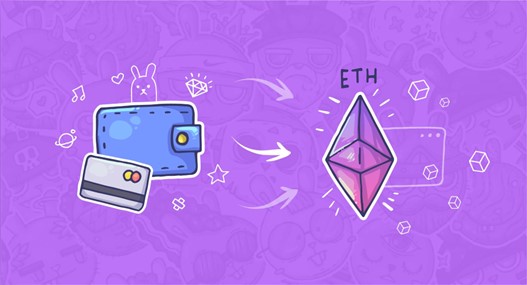
The second step in purchasing any NFT, is to buy some Ethereum. For this step, you can purchase Ethereum in the Metamask wallet or on a crypto exchange.
Option 1 – In the metamask mobile app you will want to press on the side panel and then “ Add Funds”. The three integration options to buy ETH in the metamask wallet are: Wyre, Transak and Moonpay. After choosing one of them, they will take you through a step by step process in order to purchase some Ethereum. The ETH will arrive directly in your Metamask wallet.
Option 2 – Purchasing Ethereum from an exchange. Gemini is one exchange we recommend. If you choose to purchase ETH from an exchange you will first need to sign up and create an account. Then you will need to enter your bank information so you are able to purchase ETH on the exchange. Once you have created a Gemini account, purchased Ethereum and created your MetaMask wallet, your last step is to send the ETH from your Gemini account to your MetaMask wallet. To copy your MetaMask wallet address- simply hover over “Account 1” and the option “Copy to clipboard” will appear like in the below screenshot.
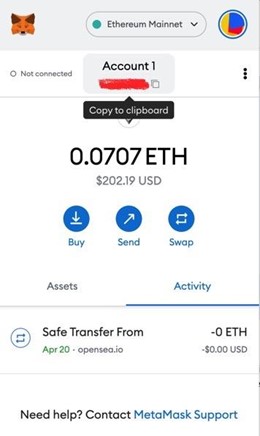
Once you send the Ethereum to your MetaMask wallet, the funds will appear and you will be able to purchase a Rad Rabbit NFT. To send the funds to your MetaMask wallet, click on the Transfer button in the top right corner of your Gemini profile- then select the “Withdraw from Gemini” page. Once you are at this page, you will select Ethereum as your currency to Withdraw and for the Destination you will want to copy your MetaMask deposit wallet address there. You will enter the amount and complete the withdraw.
Step 3 – Purchasing the Rad Rabbit
Once you have set up your wallet and you have Ethereum in your metamask you will want to navigate to the Rad Rabbits OpenSea page. Once you know which Rad Rabbit you want to purchase, connect your MetaMask wallet to OpenSea.
Once the wallet is connected, you can select which Rad Rabbit you’d like to add to your collection and press “Buy Now” and continue through the checkout process. You will need to account for gas fees – so make sure you have enough ETH in your wallet for gas fees. A gas fee is a term used to describe a “transaction” fee.
Where is Your Rad Rabbit?
Once your NFT is purchased, it is stored on the blockchain. The smart contract address of the NFT’s collection is provided after purchase. Your NFT will appear in your MetaMask wallet and will be visible on your Opensea profile.
What Comes with a Rad Rabbit?
To ensure uniqueness and rarity of the project’s characters, each Rabbit comes with exclusive items, such as the original hand-drawn sketch and other content that only belongs to the owner. The NFT is also an entry into the official Rad Party in Los Angeles in 2023 and other future events.
One main future goal of the project is expanding the 2D Rad Rabbits into the Metaverse within the next year in 2023 with “The Warren.” A warren is a rabbit ecosystem where the species live. Rad Rabbits plans to digitize this world, creating a Web3 space where collectors can jump down the rabbit hole and interact with other Rabbits and NFT collectors.
The following series of the NFT collection will launch on the 11th of every month, with the last launch in January of 2023.
To learn more about Rad Rabbits, visit its website and join the herd.
Credit: Source link